Answer
How do lenders review a sponsor's model in CRE Build?
The sponsor shares a private copy to your email address. You sign in with that address, free, and open your own copy with the sections the sponsor chose to include. Run your own cases, test the loan sizing, then send a proposal back. You can't change the sponsor's model itself.
Answer
What does it cost a lender or LP to use CRE Build?
Nothing. People you share with sign up free and get Pro. They work in their own copy of each deal shared with them and send proposals. You can download the Excel figures if the sponsor includes them. Every deal shared with you sits in one Shared with me inbox, which you can filter by Open, Ended, Withdrawn or All.
Fit
Built for, and not for
Built for
- Lenders reviewing a sponsor's multifamily deal.
- LPs and JV partners checking the waterfall and returns.
- Sponsors who want their capital partners working in the model.
Not for
- Asset types other than multifamily.
- A broker CRM, a property-management system or appraisal software.
Workflow
Shared → Receive → Open → Run → Propose → Track
Step 01
Shared
The sponsor shares a private copy bound to your email, picking Lender, Equity partner or custom sections, and an end date or none.
Sharing & lender review →
Step 02
Receive
The invite names the sponsor and the deal, and your reply goes straight to the sponsor.
Sharing & lender review →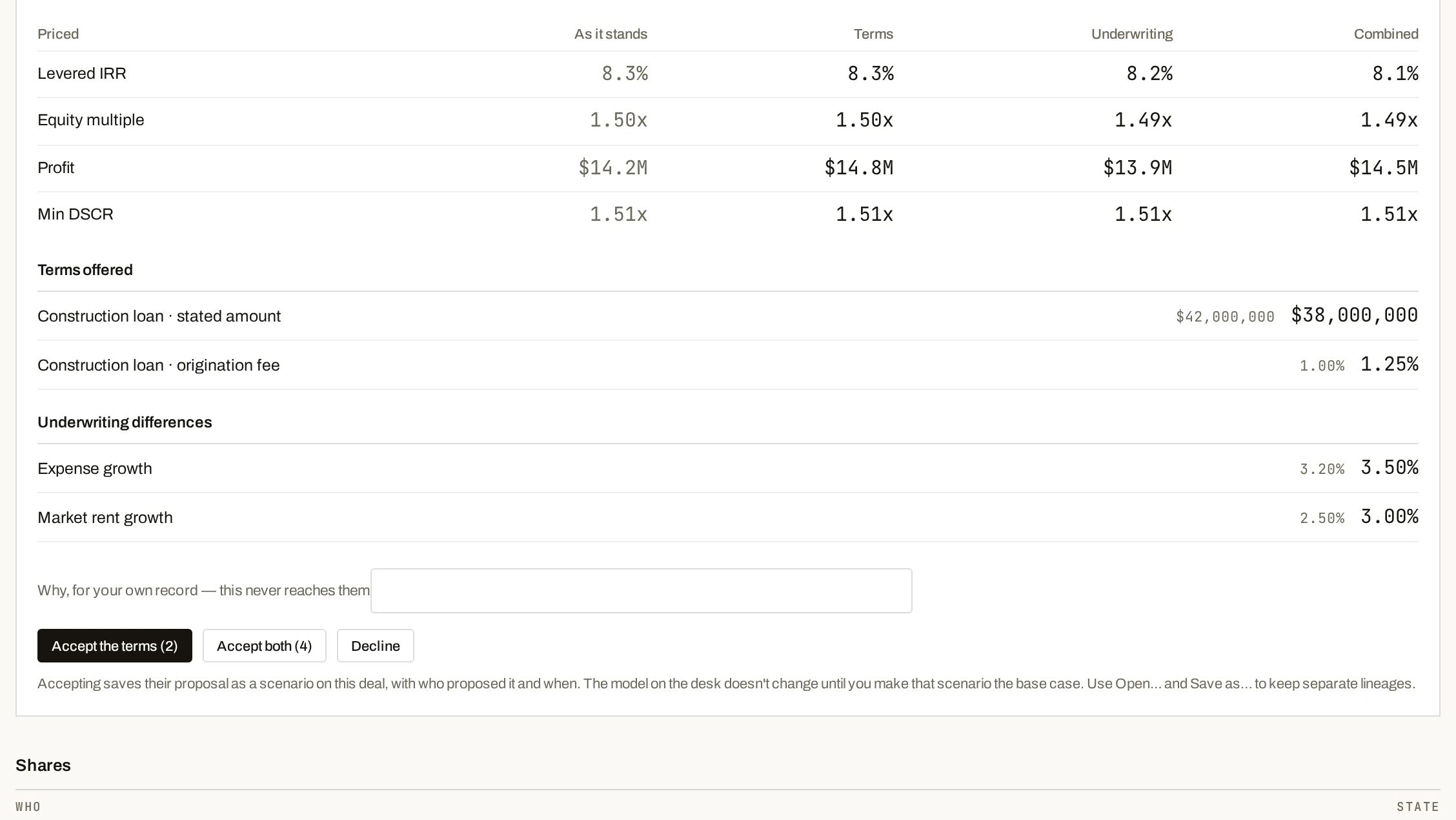

Step 04
Run your cases
Recipients build their own cases in their copy. Stress the sizing tests, change the Sized on rule, and run a two-way sensitivity grid or a tornado.
Debt & loan sizing →Step 05
Propose
Send a proposal: terms you're offering and underwriting you dispute.
Sharing & lender review →

Step 08
Take the new version
When the sponsor publishes, take the new version.
Sharing & lender review →
Excel figures
The figures in Excel, when the sponsor includes them
You review free, and you can download the Excel figures the sponsor lets you see. It's off unless the sponsor turns on Export to Excel for the share.

Comparison
A file in your inbox vs your own copy of the model
| Job | Your spreadsheet | cre.build |
|---|---|---|
| Review the deal | Read the sponsor's file. | Work in your own private copy of the sponsor's model. |
| Test the loan | Rebuild the sponsor's model. | Run your own cases against the sizing tests. |
| Send changes back | Email a marked-up term sheet. | Send a proposal: terms and disputed underwriting, priced apart. |
| Stay current | Wait for the next file. | Take the new version. |
Methodology
Check the math yourself
Methodology
How CRE Build calculates every figure
Every number points back to its source, and the methodology page shows the math.
Methodology →FAQ
Questions
How does a lender proposal work?
A proposal splits terms from disputed underwriting, priced separately and together. The sponsor accepts the terms, accepts both, or declines.
What happens when the sponsor updates the deal?
You pull in the sponsor's updates when they publish, using Take the new version. You choose when to take it.
What if my access ends?
The sponsor sets when access ends and can withdraw or restore it. If your access has ended, you can request an extension from the share.
Pricing